
Best Free AI Virtual Staging Tools in 2026: What's Actually Free
Most free virtual staging tools charge you to download the photo. We compared 10 by what the free plan really gives you, plus the disclosure rules agents need to know.
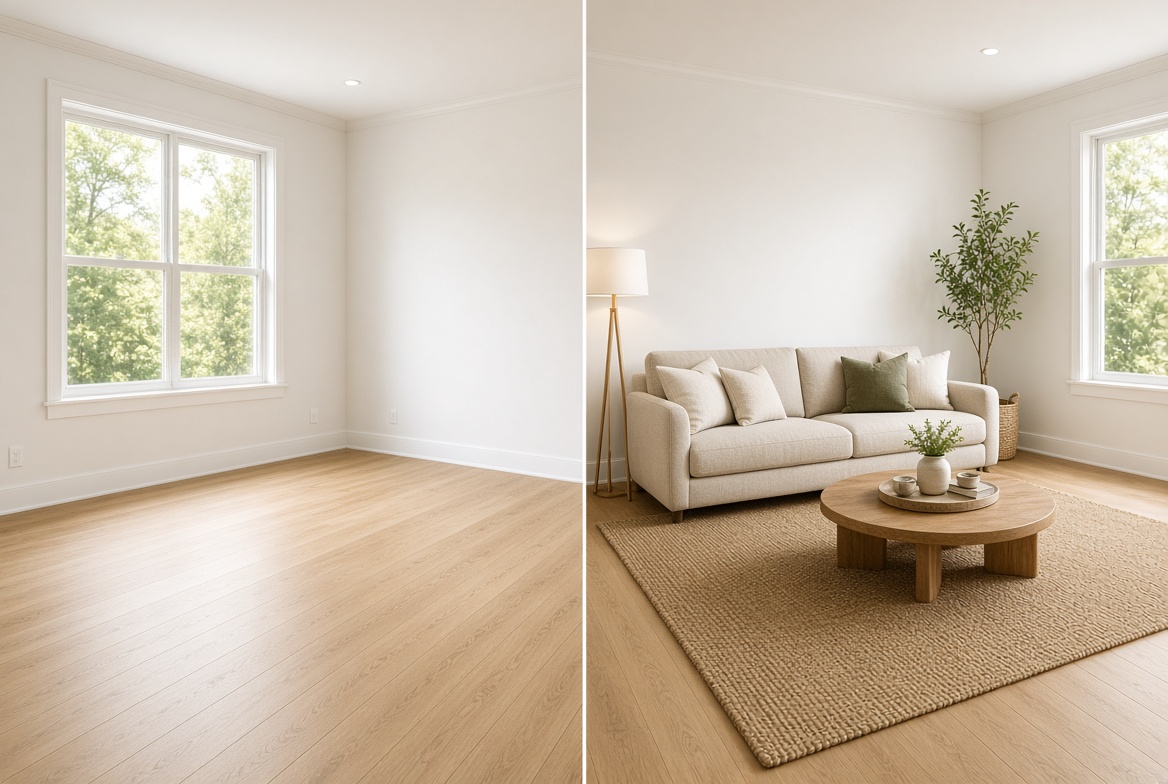
Search for free virtual staging and you will find plenty of tools that are free right up to the moment you try to download the picture. Some stamp a watermark across the image, some hand you a few credits and stop, and a few tuck the free plan behind a sign-up wall without saying what is in it.
This guide sorts through that. We compared ten AI virtual staging tools by what the free option really gives you, what you pay once it runs out, and what the rules say about using staged photos in a listing. We also ran one empty-room photo through two of them, so you can see real output instead of marketing screenshots. Prices and limits were checked in October 2026, and we flag every place where sources disagree.
The short answer: which free virtual staging tool should you try first?
If you only read one section, read this one. For a no-card, no-fuss test, start with VirtualStaging.tools: three photos, same model as the paid plans. If your photos still have furniture in them, try AI HomeDesign or REimagineHome. If you will stage a lot of photos on a budget, test Collov AI. Everything else depends on whether you want software, a human designer or a 3D design tool, and the table shows the trade-offs.
| Tool | What the free option gives you | Watermark on free output | Paid from |
|---|---|---|---|
| VirtualStaging.tools | 3 photos in total, no card | Yes | $25/mo (36 photos) |
| AI HomeDesign | Free start, credit amount not stated | Not stated | $19/mo billed yearly (30 photos) |
| REimagineHome | 5 free designs, no card | Yes, per HousingWire | $14–$99/mo range |
| Collov AI | Small watermarked trial | Yes | $19/mo (60 photos) |
| Virtual Staging AI | Free try, limits not stated | Yes, per HousingWire | $16/mo (6 photos) |
| Imagen AI | 250 to 1,000 free edits, no card | AI-disclosure mark | About $0.32 per edited photo |
| Homestyler | Unlimited 1K renders, 3 AI credits | Removed on paid plans | $6.80/mo |
| Apply Design | "Try for free", terms not stated | Not stated | $7 per image (DIY) |
| Styldod | Free start via REimagineHome | Not stated | $16 per image |
| BoxBrownie | 3 enhancements and 1 day-to-dusk, no staging | Not applicable | $30 per image |
A "not stated" means the vendor's own pricing page does not say. We would rather tell you that than guess. Plan details for every tool are in its review in our AI real estate category.
What "free" really means in virtual staging
Nobody gives away unlimited, high-resolution, watermark-free staging. What you get falls into one of five patterns, and knowing which one you are looking at saves a lot of clicking.
- A watermarked trial. You can generate and preview, but exports carry a mark until you pay. VirtualStaging.tools and Collov AI work this way, and HousingWire reports the same for REimagineHome and Virtual Staging AI.
- A tiny credit allowance. Homestyler's free plan includes 3 AI credits in total, while its AI Stager costs 10 credits per image. The AI part is effectively locked until you pay.
- Free for the other jobs. BoxBrownie's free account covers three image enhancements and one day-to-dusk edit. Staging itself is not included.
- Free to edit, paid to stage. Imagen offers hundreds of free edits, but it does not publish a staging price on its main pricing page.
- A free start with no numbers. AI HomeDesign, Styldod and Apply Design all advertise one without stating the amounts.
The practical rule: treat the free option as a test drive, not a workflow. Use it to judge quality on your own photo, then pay for one month of whichever tool wins.
Our test: one empty room, two tools
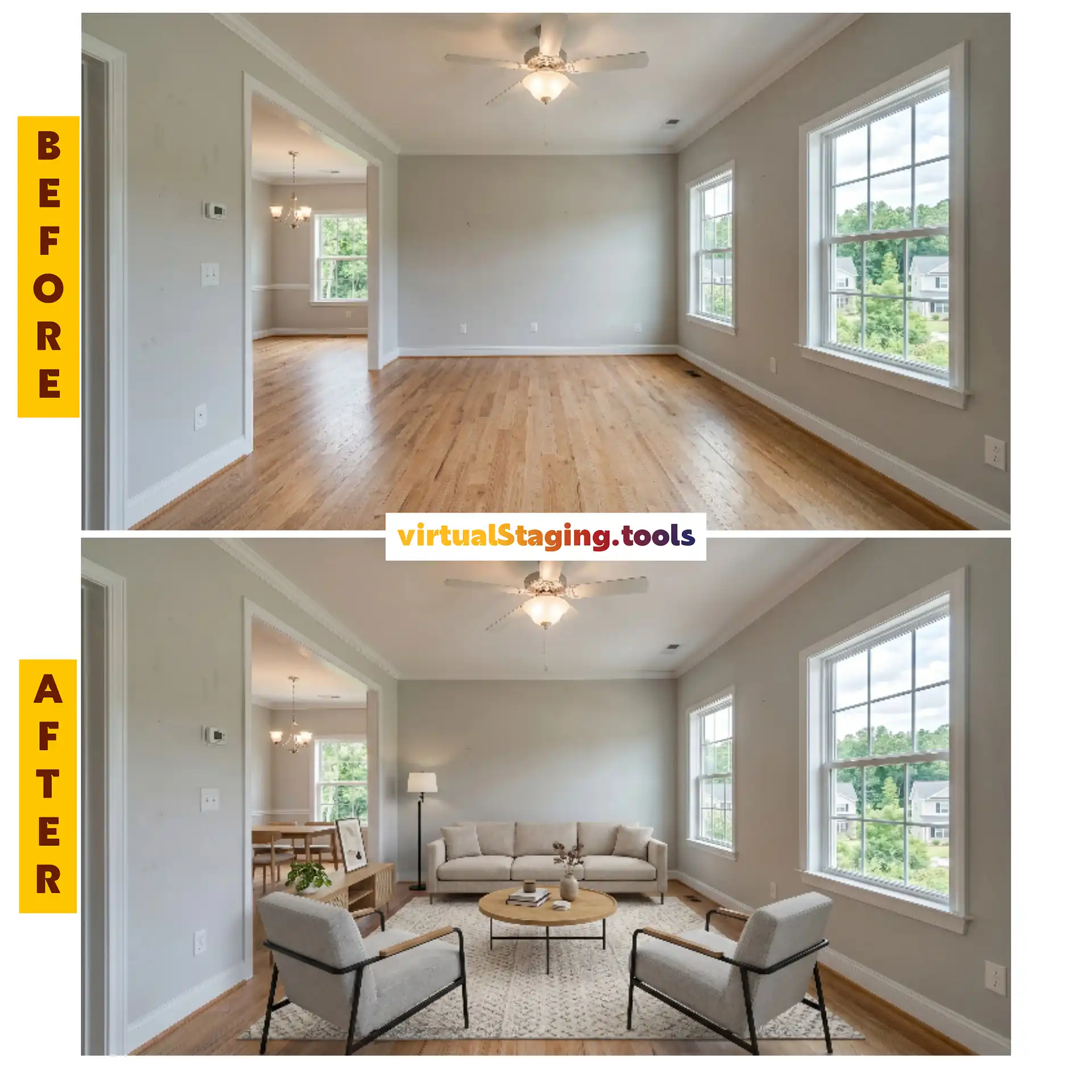
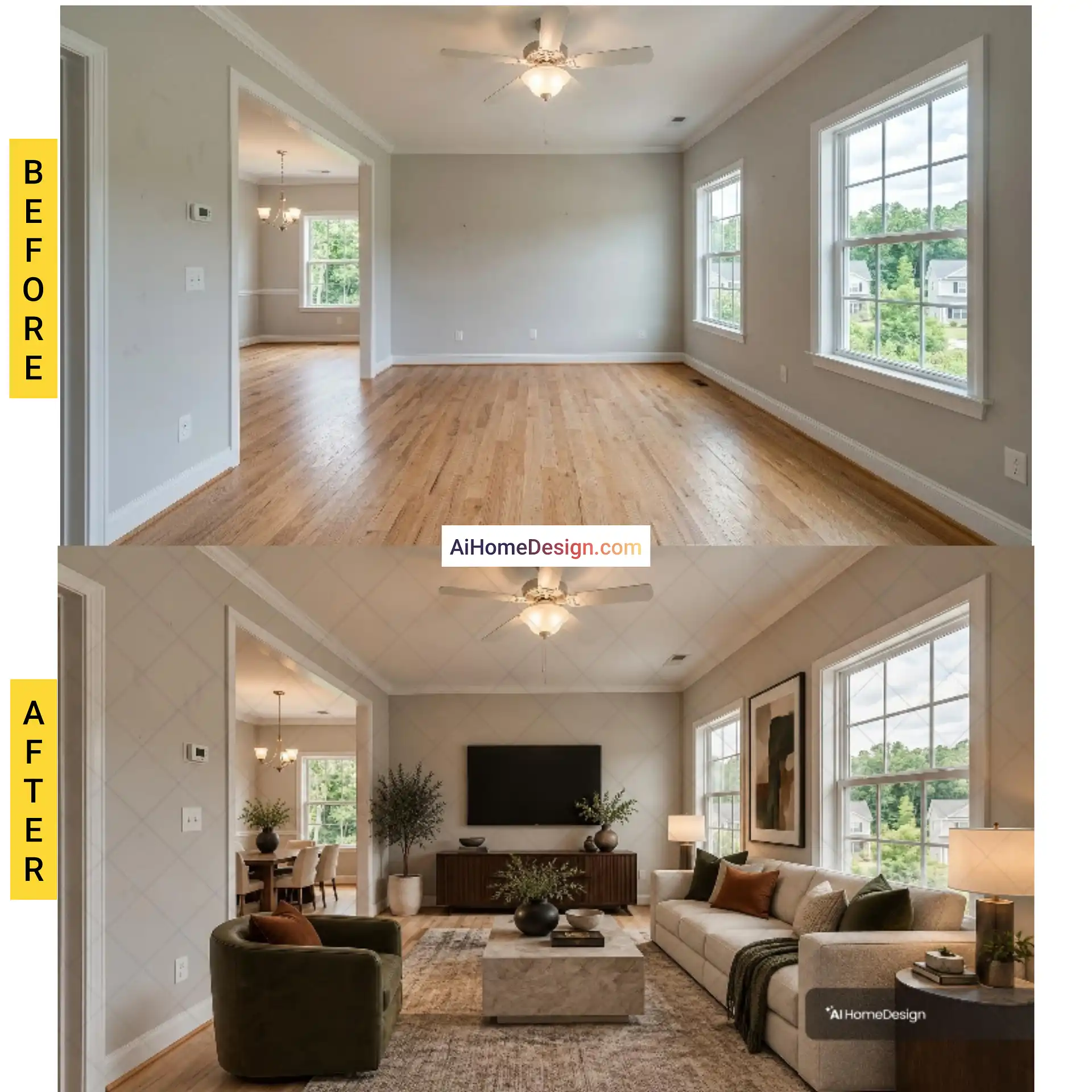
We took a single empty-room photo and ran it through two tools: the free plan of VirtualStaging.tools and the free trial of AI HomeDesign. One photo is not a benchmark, so treat this as a sanity check rather than a verdict. What it does show is what you actually get when you press the button on a free account.
What the VirtualStaging.tools free plan looks like
Here is the pricing page as we saw it. The free column is the first one: three photos in total, no card, results with a watermark. Its FAQ says free accounts use the same model, styles and output size as paid ones, which is what makes the test meaningful.

And this is the empty room before and after, straight from the free plan.
The same room in AI HomeDesign
Same photo, different tool. AI HomeDesign's pricing page does not say how many trial credits you get, so you only find out inside the app.
How to judge a staged photo
Do not judge on the first glance, because every staged photo looks fine as a thumbnail. Zoom in and check five things:
- Does the room itself stay untouched? Windows, doors, floors and ceiling lines should look exactly like the original.
- Is the furniture the right size? A sofa that dwarfs the room, or a rug that stops short of the walls, is the most common giveaway.
- Do shadows match the light? Shadows should fall away from the window, not straight down.
- Are the edges clean? Look where furniture meets the floor and the wall for halos or blur.
- Is the watermark in the way? Some marks cover the middle of the image, which makes a free export useless for anything but a private preview.
What this test cannot tell you
One room, one photo, one afternoon. Staging quality moves with the photo: a bright, level, wide shot of a clean room gives any tool an easy job, while a dark corner with an odd window does not. Run your own worst photo through your shortlist before you trust anyone's comparison, including this one.
The 10 tools, one by one
1. VirtualStaging.tools: best first test, no card needed
The free plan covers three photos in total, with a watermark, up to three versions per photo and no credit card. The fine print is the useful part: free accounts get the same model as paying customers, so what you see is what a subscription produces. Each photo takes about 30 seconds, and furniture removal, virtual renovation and virtual twilight draw from the same credits. Paid plans start at $25 a month for 36 photos (see the pricing), and watermark-free output requires an active subscription. Every download comes with a disclosure starter file, which saves you one chore. Full details are in our VirtualStaging.tools review.
2. AI HomeDesign: best if the room still has furniture in it
HousingWire's 2026 virtual staging comparison rated its furniture removal as excellent, including removing single items rather than wiping a whole room. The staging itself was less consistent: about three quarters of the images looked realistic, and furniture proportions were sometimes off. Plans on its pricing page are $35 a month for 30 photos, or $19 a month billed yearly, with free regenerations. The free start exists, but the amount is not stated, so test it with one photo. Read the AI HomeDesign review.
3. REimagineHome: best for agents who worry about MLS rules
HousingWire's testers gave it the best furniture removal in their comparison and noted that it is trusted for CRMLS and runs compliance checks on each photo. New users get five free designs with no card, and the free output is watermarked. The pricing page lists Essential, Pro, Advanced and Agency credit plans but not the prices in its text, and sources disagree, so confirm the live numbers. It comes from Styldod, which we cover below. See the REimagineHome review.
4. Collov AI: cheapest per photo at volume
Collov's pricing page lists $19 a month for 60 photos, scaling to 526 photos for $127, with extra photos at $0.24 on Enterprise. Regeneration is unlimited and paid plans are watermark-free. The free trial is small and watermarked. Higher tiers add twilight, lawn replacement, 360 panoramas and a virtual tour builder. HousingWire's review found more furniture-removal errors than REimagineHome, so test that on a messy room. More in the Collov AI review.
5. Virtual Staging AI: simplest for a few photos
Upload, pick a style, wait about 15 seconds. That is the whole pitch, and for one-off listings it works. The pricing page lists plans from $16 a month for 6 photos to $79 for 150, while the site also advertises $1 per image, so check which model applies today. HousingWire noted it costs more per image than Collov, and independent reviews mention no batch processing. See the Virtual Staging AI review.
6. Imagen AI: best when the whole gallery needs editing
Imagen is a photo-editing tool first: it corrects exposure, white balance and perspective across a whole shoot, then handles object removal, twilight conversion and staging as exceptions. The main pricing page promises 1,000 free edits with no card, while the real estate sign-up says 250, so expect at least 250. Editing runs about $0.32 a photo pay-as-you-go, but staging pricing is not published there. Much of what you will read about its staging was written by Imagen itself, so weigh it accordingly. Our Imagen AI review has the details.
7. Homestyler: best free 3D design tool, weakest free AI
Homestyler is a 3D room designer with a library of more than 100,000 free models, not a one-click stager. The free Basic plan gives unlimited 1K renders but only 3 AI credits, and its AI Stager costs 10 per image. On the paid plans (pricing), Pro+ at $6.80 a month includes 180 AI credits, which is about 18 AI-staged photos a month. Master+ at $11.80 includes 380, about 38. Good if you like to design a room yourself, slower than the AI-only apps. See the Homestyler review.
8. Apply Design: best when you want to place the furniture yourself
A drag-and-drop editor with more than 18,000 furniture pieces and support for 2D and 360-degree images. Apply Design lists DIY staging at $7 an image and staged work from $10.50 with decluttering included, with about ten minutes per render. It offers a "try for free" sign-up, but the pricing page does not say what that includes. Slower and pricier per image than the AI subscriptions, but you control exactly where everything goes. Read the Apply Design review.
9. Styldod: human staging with an AI sibling
Styldod has been around since 2015. Its own cost guide quotes $16 to $23 an image for virtual staging, with most images delivered in 24 to 48 hours and unlimited revisions. HousingWire also lists Matterport staging at $25 per hotspot and virtual renovation at $5 an image. Its site presents ReimagineHome as the self-serve AI platform, so the AI route and the human route come from the same company. See the Styldod review.
10. BoxBrownie: best for hero photos on luxury listings
Human editors furnish the room, scale each piece to the room's dimensions and deliver in under 48 hours. BoxBrownie's staging page lists $30 per image and unlimited changes within two months, though several third-party roundups still show $24. The free account covers three enhancements and one day-to-dusk edit, not staging. Worth it for the one photo that sells the listing, not for every room. See the BoxBrownie review.
What virtual staging costs per photo
Free plans get you a test. Paying is where the tools really separate. The figures below divide each vendor's published plan price by the photos it includes, so they are approximations, before tax and promotions.
| Tool | Published price | Roughly per photo |
|---|---|---|
| Collov AI | $19 for 60 photos up to $127 for 526 a month | $0.24–$0.32 |
| AI HomeDesign | $19–$49 a month billed yearly for 30–200 photos | $0.24–$0.63 (up to $1.17 billed monthly) |
| VirtualStaging.tools | $13–$69 a month billed yearly for 36–216 photos | $0.32–$0.36 ($0.49–$0.69 billed monthly) |
| Homestyler (AI Stager) | $6.80–$11.80 a month for 180–380 credits | About $0.31–$0.38 |
| REimagineHome | Plan prices differ between sources | About $0.10–$0.63 on HousingWire's plan list |
| Virtual Staging AI | $16 for 6 photos up to $79 for 150 a month | $0.53–$2.67 |
| Apply Design | Per image | $7–$10.50 |
| Styldod | Per image | $16–$23 |
| BoxBrownie | Per image | $30 ($24 on some lists) |
| Imagen AI | Staging price not published | About $0.32 per edited photo |
Here is what that means for a typical job, staging 12 photos for one listing:
| Approach | Rough cost for 12 photos | Turnaround |
|---|---|---|
| AI subscription (Collov or VirtualStaging.tools) | About $19–$25 for the month | Seconds per photo |
| Apply Design, DIY | About $84 | About 10 minutes per render |
| Styldod | About $192–$276 | 24 to 48 hours |
| BoxBrownie | About $288–$360 | Under 48 hours |
The pattern is clear. Software is dozens of times cheaper per photo, and human designers earn their price on the one or two shots that carry the listing. For context, our guide to AI tools for real estate agents cites $3,000 to $8,000 per listing for physical staging.
Do you have to disclose virtually staged photos?
In California, yes, and the rest of the country is moving the same way. Under California's AB 723, effective January 1, 2026, agents, brokers, developers and marketing teams must disclose digitally altered listing images, according to the San Diego MLS summary of the law. The practical points from that guidance:
- Label the altered image. It should clearly say it has been digitally altered. Virtually staged photos are commonly labelled "Virtually Staged".
- Make the original reachable. Online, show the original next to the edited photo or link to it. In print, use a QR code or link.
- Know what counts. Adding or removing furniture, changing walls, flooring or landscaping, and AI images of things that do not exist need disclosure. Lighting, colour balance and cropping do not, as long as the property itself is not changed.
Outside California, MLS rules vary, so check yours, and treat disclosure as good practice either way. Buyers who feel misled at a showing hurt you more than a label ever will. Never stage a photo to hide a defect. This is general information, not legal advice, so check with your broker or an attorney. Some tools help: VirtualStaging.tools ships a disclosure starter file, and HousingWire says REimagineHome runs compliance checks. Our AI tools for real estate agents guide goes deeper on the trust problem.
How to get the most out of a free plan
- Pick your best empty-room photo. Straight-on, level, bright, wide, with windows that are not blown out. A poor photo wastes a free credit.
- Test one room, not the whole listing. Run the same photo through two or three tools and compare.
- Check the export before you commit. Look at the watermark, the resolution and the file size.
- Zoom to 100%. Check furniture feet, shadows and the line where wall meets floor.
- Keep the original and label the staged one. See the disclosure rules above.
- Pay for one month of the winner. Run the whole listing, then cancel if you do not need it. Collov AI, VirtualStaging.tools and Virtual Staging AI all say you can cancel at any time.
- Finish the job. Write the listing description with ChatGPT and build the flyer in Canva.
Which free virtual staging tool fits your situation?
| If you... | Start with | Why |
|---|---|---|
| Just want to test staging today | VirtualStaging.tools | Three free photos, same model as paid |
| Have photos with furniture in them | AI HomeDesign or REimagineHome | Strongest furniture removal in HousingWire's test |
| Stage many photos on a budget | Collov AI | Lowest per-photo price at volume |
| Stage one or two photos a month | Virtual Staging AI | Simple, quick, small plans |
| Edit a whole shoot, then stage | Imagen AI | Batch editing with staging as a finishing step |
| Want to design the room in 3D | Homestyler | Large free model library |
| Want to place every piece yourself | Apply Design | Drag-and-drop editor, 360 support |
| Need a human designer | Styldod or BoxBrownie | Revisions and hands-on quality control |
Final thoughts
The honest answer to "what is the best free virtual staging tool" is that none of them is free in a way you can build a business on. What you can get is a fair test, and that is worth more than any ranking. Run your own photo through two tools, check the export, read the disclosure rules for your market, and only then pay.
We will update this guide as plans change, which in this category happens often. To keep exploring, browse every tool in our AI real estate category, or read the wider guide to AI tools for real estate agents.
Jordan Patel is a tech analyst at ToolVerse AI, covering AI tools and the future of software. Jordan has been writing about AI since 2022 and personally tests every tool covered in this guide.
- Hands-on AI tester
- Covers AI since 2022
- ToolVerse AI editorial team
Frequently asked questions
Our verdict on this real estate guide
The ToolVerse AI editorial team evaluated every tool and claim in "Best Free AI Virtual Staging Tools in 2026: What's Actually Free" against five criteria, with hands-on testing, source-checking and a quarterly accuracy review.
- Ease of useOnboarding flow, UX clarity and time-to-first-value.5.0
- Features & depthBreadth of capabilities vs. category benchmarks.5.0
- Pricing valueFree-tier generosity and price-to-output ratio.4.9
- PerformanceSpeed, reliability and output quality in real tests.4.3
- Support & docsHelp center, response times and community resources.4.4
How we evaluate AI tools
Every product on ToolVerse AI is independently tested by our editors. We sign up, complete the same real-world tasks across each tool in a category, document the experience, and compare against direct competitors. We don't accept payment for rankings, and affiliate relationships never influence editorial scores. Scores are reviewed quarterly to reflect new features, pricing changes and user feedback.
Related articles

Best AI Tools for Real Estate Agents in 2026
82% of agents now use AI — but a February 2026 investigation found AI-staged photos are quietly disappointing buyers at showings, and California just made disclosure the law. Here's how to use these tools without the trust problem.

Best AI Image Generators in 2026 (Tested & Ranked)
The AI image generation race stopped being a two-horse contest in 2026. Here's how Midjourney, DALL·E's successor, Stable Diffusion, Flux and Ideogram actually compare once you look past the marketing.

50+ Best Free AI Tools in 2026 (Every Category, Tested)
Free AI tools now cover almost every category of knowledge work — chat, writing, image generation, video editing, voice, research, coding and data analysis. The question in 2026 isn't whether a free option exists anymore. It's which one actually fits the job. Here's the full breakdown, category by category.